🎉 New Update: Cleaner Tips + Pinned Shortcuts + 130+ Shortcut Library
We’ve just rolled out a new update to Excel Shortcut Coach, and it’s all about making shortcut learning smoother, cleaner, and more personal while you work.
If you’ve ever wished you could keep your favorite Excel shortcuts on screen or revisit a tip later, this one’s for you.
✅ Expanded Shortcut Library: Now 130+ Shortcuts
Excel Shortcut Coach now includes an expanded shortcut library with 130+ shortcut tips covering everything from everyday actions (Copy/Paste, formatting, navigation) to deeper power-user workflows (Data tools, tables, pivots, views, and more).
That means more moments where the Coach can catch a mouse-driven action and instantly show you the faster key combo — so you learn shortcuts naturally as you work.
✨ Smarter, Cleaner Tip Design
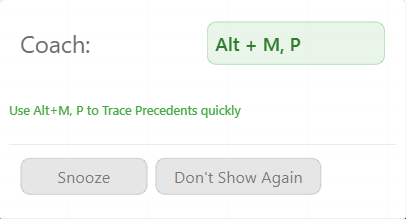
Shortcut tips have received a UI refresh to make them easier to read and less distracting:
- Clearer layout and spacing
- Improved visual hierarchy for shortcuts vs. explanations
- Smoother animations and positioning
- Less visual noise while you’re actively working in Excel
Before:
After:
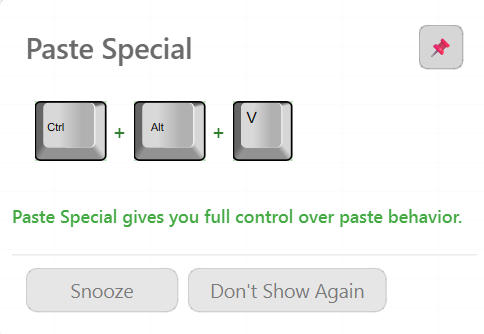
The goal is simple: show the right shortcut at the right moment—without breaking your flow.
📌 Introducing Pinned Shortcuts
The biggest update? Pinned Shortcuts.
Now, when a shortcut tip appears, you can pin it to keep it on your screen instead of letting it fade away.
What pinned shortcuts do:
- Stay visible until you remove them
- Can be dragged anywhere on your screen
- Don’t auto-close like regular tips
- Let you focus on shortcuts you want to reinforce
This is perfect when you’re:
- Learning a new shortcut pattern
- Repeating a task throughout the day
- Actively trying to break mouse-heavy habits
📂 New “Pinned Shortcuts” Tab
Pinned tips don’t just live on your screen — they’re also saved automatically.
We added a Pinned Shortcuts tab so you can:
- See all your saved tips in one place
- Double-click any saved tip to show it on screen again
- Remove shortcuts once they’ve fully clicked
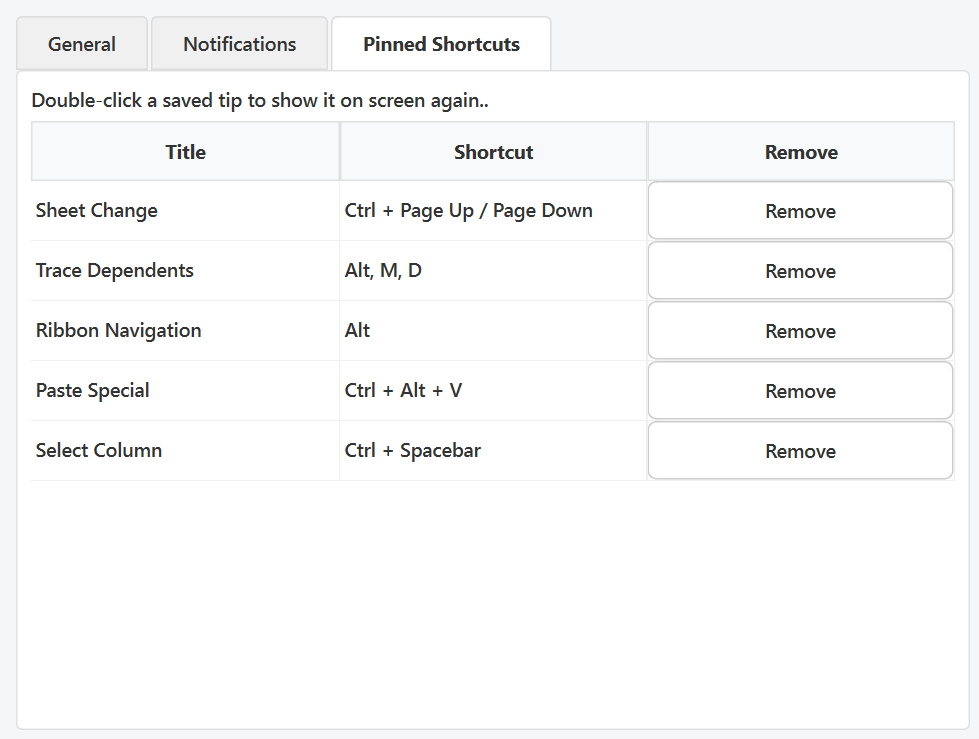
Think of it as your personal Excel shortcut cheat sheet, built naturally as you work.
🧠 Learn Shortcuts the Way Habits Actually Form
This update reinforces what Excel Shortcut Coach does best:
- No courses
- No memorization sessions
- No static lists
You learn shortcuts in real time, based on what you actually do in Excel — and now you can keep the most important ones front and center.
🚀 Try It Out
The update is live now. Open Excel, use your mouse like you normally would, and start pinning the shortcuts you want to master.
As always, keep the feedback coming — every update is shaped by how people actually use Excel in the real world.
Try it today!
Download Excel Shortcut Coach and start learning shortcuts in real time.